
Iptv Solution
IPTV is only Buffering in the UAE | Causes and Complete Solution

Dec
IPTV and Internet Buffering Issues in the UAE
Are you in the UAE, and has your IPTV become your great headache? Hold on, you are not the only one who is facing these issues. For IPTV (Internet Protocol Television), running good internet is a must. But after the fiber cut, undersea internet in the UAE is still not up to the mark. Too much packet loss during peak hours causes slow loading of the IPTV apps or too many buffering issues.
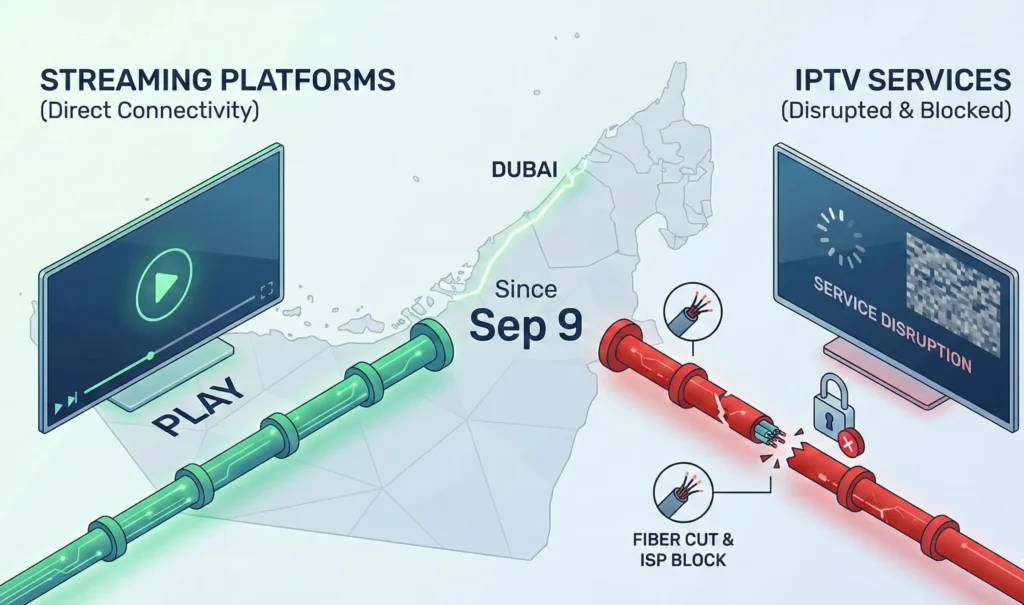
Causes of the IPTV Buffering in the UAE:
1. ISP (Internet Service Provider): Since September 9th, users in the UAE—particularly in Dubai—have experienced significant disruptions with IPTV services, largely due to internet pipeline damage caused by fiber optic cable cuts. [source] This instability is further compounded by strict measures from local ISPs blocking international broadcasting services, creating a specific bottleneck for unauthorized streams. Consequently, while major platforms like YouTube and Netflix continue to operate smoothly due to their authorized status and local infrastructure, IPTV applications relying on compromised international connections are facing frequent buffering and connectivity failures.
2. Internet Speed: A slower internet speed can result in buffering and poor streaming quality. Ensuring a good internet speed is essential, particularly in Dubai and the UAE, where high-speed internet is crucial for smooth IPTV streaming.
3. App Cache Issues: Over time, the IPTV app cache can hinder loading and lead to buffering.
Best Practices for Getting Bufferless IPTV in the UAE:
1. Choose a Good ISP: It’s mandatory to select a reliable ISP that does not block international broadcasting services. This will improve the IPTV streaming experience on apps. In the UAE and Dubai, selecting a good ISP is especially important for a smooth IPTV experience.
2. Ensure Sufficient Internet Speed & Stability: A good internet connection is the backbone of high-quality IPTV services. While 10 Mbps is often cited as the minimum requirement for basic streaming, a seamless experience—particularly for live sports and high-definition content—demands more bandwidth. In Dubai and the UAE, where high-speed fiber infrastructure is widely available, users should aim for higher tiers to prevent buffering and latency issues.
If you are experiencing lag, consider the following upgrades and technical benchmarks:
- Latency (Ping): Low latency (below 20 ms) is vital for live TV to ensure the feed is real-time and responsive.
- Bandwidth Requirements:
- Standard Definition (SD): Minimum 10 Mbps.
- High Definition (HD/1080p): Minimum 15–20 Mbps.
- 4K / Ultra HD: A minimum of 30–100 Mbps is essential for buffer-free viewing.
Connection Type: Wi-Fi can be inconsistent due to signal interference. For the most stable IPTV connection, hardwire your device using an Ethernet (LAN) cable directly to the router.
3. Optimize App Performance & Maintenance
Over prolonged use, IPTV applications accumulate temporary data known as cache. While intended to speed up loading, excessive or corrupted cache can lead to performance bottlenecks, freezing, and playback errors.
- Routine Maintenance: Navigate to your device’s settings and clear the app cache regularly to free up memory (RAM).
- Software Updates: Always ensure you are running the latest version of your IPTV player. Developers frequently release patches to fix bugs and improve stream stability, which is crucial for maintaining high-quality playback
4. Restart the Wi-Fi Router
Sometimes restarting the internet router can clear the heavy cache from the TV. Some tv can some old cache and make issues of buffering or slow app loading
5. Choose a good IPTV seller:
A good IPTV server can ensure the best quality and stable service to its customers. Best IPTV Dubai not only sells IPTV service but also provides complete solutions for any disruptions during the subscription period. 24/7 support and nonstop follow-up made Best IPTV Dubai the ultimate choice for the users of the UAE.
6. Prioritize Low-Latency Server Connections
The physical distance between your device and the content source significantly impacts streaming quality. Data traveling long distances results in higher latency (ping), which causes buffering.
- Geographic Proximity: While many major IPTV hosting centers are located in the UK, USA, or Europe, you should always select the server node geographically closest to you if your provider offers this option.
- For UAE Users: Selecting a server optimized for the Middle East or Europe can drastically reduce the “travel time” of data packets, ensuring a smoother, buffer-free experience in Dubai and the wider region.
5. VPN Optimization for Streaming
For users in the UAE and Dubai, a Virtual Private Network (VPN) is often essential to bypass ISP throttling or geo-restrictions. However, encryption overhead can slow down your connection. To mitigate this:
Protocol Choice: If available, use modern, lightweight VPN protocols like WireGuard or IKEv2, which offer faster speeds for streaming compared to older protocols like OpenVPN.
Server Selection: Choose a VPN server location that balances proximity with access. Connecting to a server closest to your physical location (or closest to the IPTV source) minimizes the distance data must travel, improving throughput.
Popular VPN Services:
- ExpressVPN operates as a secure VPN service that delivers quick connections to users throughout the United Arab Emirates and Dubai.
- NordVPN operates as a reliable VPN service that delivers exceptional performance for streaming and IPTV applications.
- CyberGhost operates as a fast and secure VPN service, which many users in the UAE and Dubai employ for IPTV access.
- Surfshark provides users with an affordable VPN solution that delivers efficient IPTV streaming capabilities.
IPTV users in the UAE have faced widespread buffering and connectivity issues driven by undersea fiber cuts and stricter ISP blocking of international streams. To counter these disruptions, viewers should prioritize high-speed internet connections—ideally hardwired via Ethernet—while performing regular maintenance like clearing app cache and restarting routers to prevent software bottlenecks. Ultimately, achieving a buffer-free experience requires a multi-pronged approach: selecting a reliable IPTV provider with low-latency servers, utilizing optimized VPN protocols to bypass ISP throttling, and ensuring sufficient bandwidth to handle high-definition content during peak hours.
